
Predictive maintenance from the signal to the work order
Kinetia reads your machines' signals, notices when they start to change before a fixed threshold trips, explains what is happening with the manuals at hand and prepares the job. It runs on your own servers, alongside the rest of the AiDream suite.
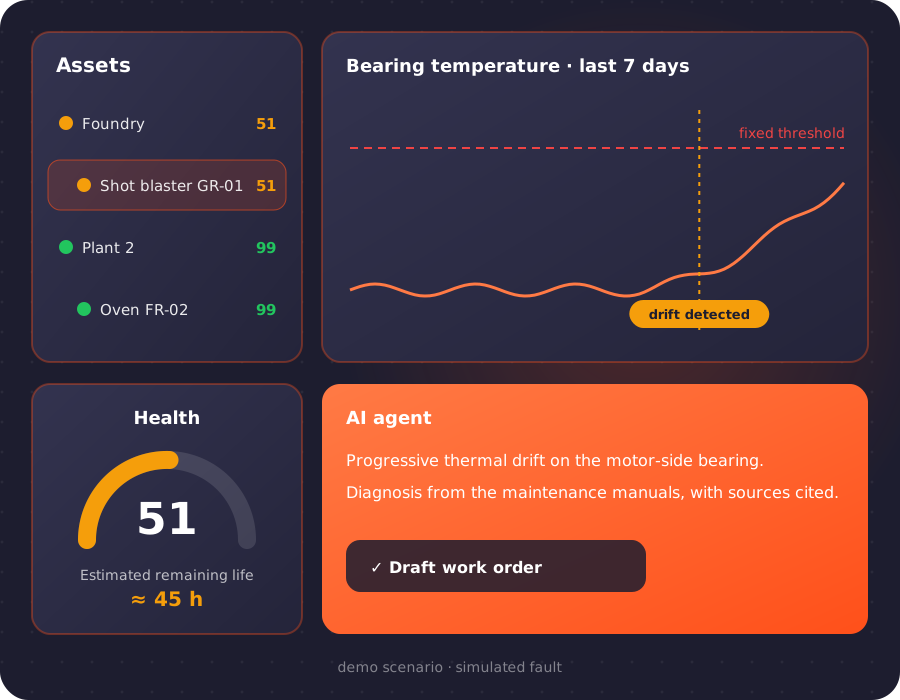
The principle: notice before the threshold
A fixed-threshold alarm goes off when the failure has already arrived. Kinetia learns how each machine behaves when it is healthy, shift cycles included, and flags the deviation while it is still small. Then it does not stop at the signal: it turns it into an explanation, a diagnosis and a work order.
Drifts, not just spikes
A temperature that creeps up a little every day never crosses the threshold until it is too late. Kinetia's detectors look at exactly that trend.
Every anomaly comes with an explanation
The AI agent describes what changed compared with normal and proposes a diagnosis taken from the maintenance manuals, with sources cited.
Everything stays in the plant
Collection, storage, models and AI run on-premise: machine data never leaves the company perimeter.
From field data to work orders
One path: field, gateway, storage, scoring, anomalies, AI, people. The highlighted LLM agent is what sets Kinetia apart from traditional maintenance software.
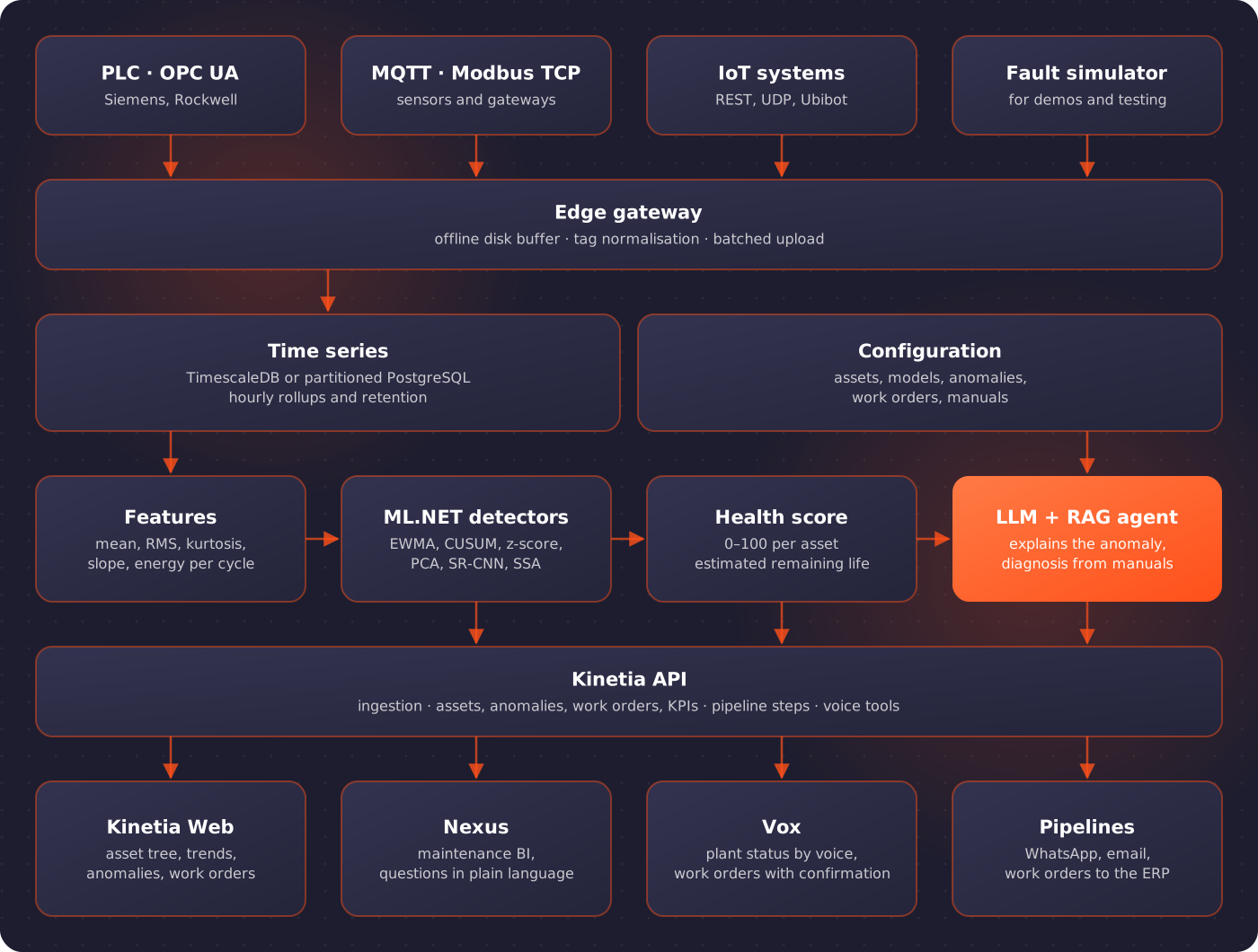
What happens to every signal
Scoring runs continuously, minute by minute, on every signal with a trained model.
Collection
OPC UA for Siemens and Rockwell PLCs, MQTT with topics and JSON payloads, Modbus TCP, IoT systems already in place and a REST ingestion API.
Edge gateway
A service installed next to the machines downloads its configuration, polls the sources and, if the network drops, keeps the data on disk until it can send it.
Storage
Measurements go to TimescaleDB, or to PostgreSQL partitioned by month where the extension cannot be installed, with hourly rollups and configurable retention.
Detection
Mean, maximum, deviation, kurtosis and slope are computed per window; detectors compare current behaviour with the normal behaviour learned from history.
Health and remaining life
Every machine has a 0–100 health score; lines and plants take the worst of theirs. With a failure history, remaining useful life is estimated too.
Action
Explanation, diagnosis from the manuals, draft work order for critical anomalies and a WhatsApp message to the technician.
What Kinetia does
Detectors tuned on your data
- EWMA for drifts, CUSUM, robust z-score for spikes, multivariate PCA for unusual combinations, fixed limits
- SR-CNN and SSA with ML.NET, on the same .NET stack as the rest of the suite
- Thresholds set to 120% of the highest score seen on normal data: daily and shift cycles do not become alarms
- An anomaly opens only after several consecutive anomalous windows, immediately if a value breaks the fixed limits
AI that knows your machines
- Plain-language explanation: machine, signal, expected value, 7-day averages and health
- RAG diagnosis over the asset's manuals knowledge base, translated with Janus if needed, with sources cited
- Draft work order with title, tasks and priority
- Local language models or AI connections already configured in the suite
Planned and condition-based maintenance
- Plans by calendar, running hours, cycles or condition on health and remaining life
- Preventive, corrective and predictive work orders; closing the order closes the anomaly
- Failure log with downtime, mode and cause
- KPIs for MTBF, MTTR, availability and failures anticipated by an anomaly in the previous 7 days
Learns from the technician
- "False positive" and "Confirmed failure" right on the anomaly page
- With recurring false positives, nightly retraining raises the model's threshold, within a limit
- Signals with open anomalies are not retrained, so the failure is never learned as normal
- Confirmations become the labels that remaining-life prediction needs
Inside the AiDream suite
Kinetia is a licensable AiDream module: same sign-in, same AI services, and it talks to the other applications.
Nexus
A "Maintenance BI" project with assets, anomalies, work orders, MTBF and MTTR, queried in plain language.
Vox
"What is the status of line 2?": plant status, open anomalies and new work orders by voice, with confirmation before anything is created.
Pipelines
Dedicated steps to read critical anomalies, request the diagnosis, create the work order and send it to the ERP, Linko included.
Notifications
WhatsApp and email to the technician with explanation and diagnosis, through the same channels as the other automations.
The demo, in five steps
It runs entirely on a laptop, with no real machine: a simulator reproduces the progressive wear of a bearing on a foundry shot blaster.
- 1
The simulator injects a slow drift into the bearing temperature.
- 2
The dashboard turns from green to yellow before the fixed threshold trips, while healthy machines stay between 99 and 100.
- 3
The technician gets a WhatsApp message with the explanation and the diagnosis taken from the machine's manual.
- 4
A draft work order opens; from Vox you ask how the line is doing.
- 5
In Nexus the maintenance dashboard shows reliability and downtime.
In the demo the shot blaster drops to health 51 with an estimated remaining life of about 45 hours, and the condition-based plan opens the work order by itself. These are figures from a simulated scenario, not results from a plant in production.
How it is adopted
Each step ends with an agreed check: if it does not pass, the next one does not start. Monitoring and anomalies pay off from day one; prediction comes once the data is there.
Pilot
One or two machines with 2–3 known failure modes are chosen, signals and history are surveyed, and KPIs are agreed: warning lead time, false positives per week, downtime avoided.
Monitoring
Gateway and connectors in the field, real data in storage, asset tree, trends, limits and failure log. The log is filled in from day one.
Anomalies
Detectors are trained on normal behaviour and validated on the pilot together with the technicians, not just on charts.
AI and integration
Manuals in the knowledge base, diagnosis, work orders, notifications, Nexus, Vox and the link to the ERP.
Prediction
After a few months of logged failures, remaining life is calibrated on real cases and condition-based maintenance replaces the calendar.
The rest of the stack
Kinetia builds on the Eulogika solutions that collect and explain factory data.
IOT DAQ WEB
Real-time machine data acquisition and monitoring, a native source for Kinetia.
Open the pageNexus and Vox
The conversational business intelligence the maintenance dashboard runs on.
Open the pageAiDream Suite
The modular AI suite Kinetia belongs to: documents, agents, industrial automation.
Open the pageFrequently asked questions
Do we need new sensors to use Kinetia?
Not always. Many useful signals, such as current draw, temperatures, pressures and cycle times, are already in the PLCs and can be read over OPC UA or Modbus. For components such as bearings it can be worth adding a vibration or temperature sensor over MQTT.
Do we need years of failure history?
No. Anomaly detection learns normal behaviour and does not need labelled failures, so it works from the first pilot. Remaining-life estimation does improve with logged failures: that is why the failure log starts on day one and prediction comes after a few months of data.
How are false alarms kept down?
Thresholds are calibrated on the machine's normal history, an anomaly opens only after several consecutive windows, and the technician can mark any warning as a false positive: with recurring ones the model raises its own threshold during nightly retraining.
Do the data and the AI stay in the company?
Yes. Gateway, storage, detection models, the manuals knowledge base and the language model are installed on-premise. The shop-floor gateway never touches the suite database: it sends measurements to the API with a dedicated key.
Does it connect to our ERP or maintenance software?
Work orders are sent to the ERP through a pipeline, directly over its API or via the Linko middleware for SAP, AS400 and Business Central; the document number returned by the ERP is recorded on the work order in Kinetia.
Shall we try Kinetia on one of your machines?
We start with a pilot on one or two machines, with KPIs agreed before we begin: warning lead time, false positives, downtime avoided.
Let's talk